HUD Meaning: Definition and Value Proposition
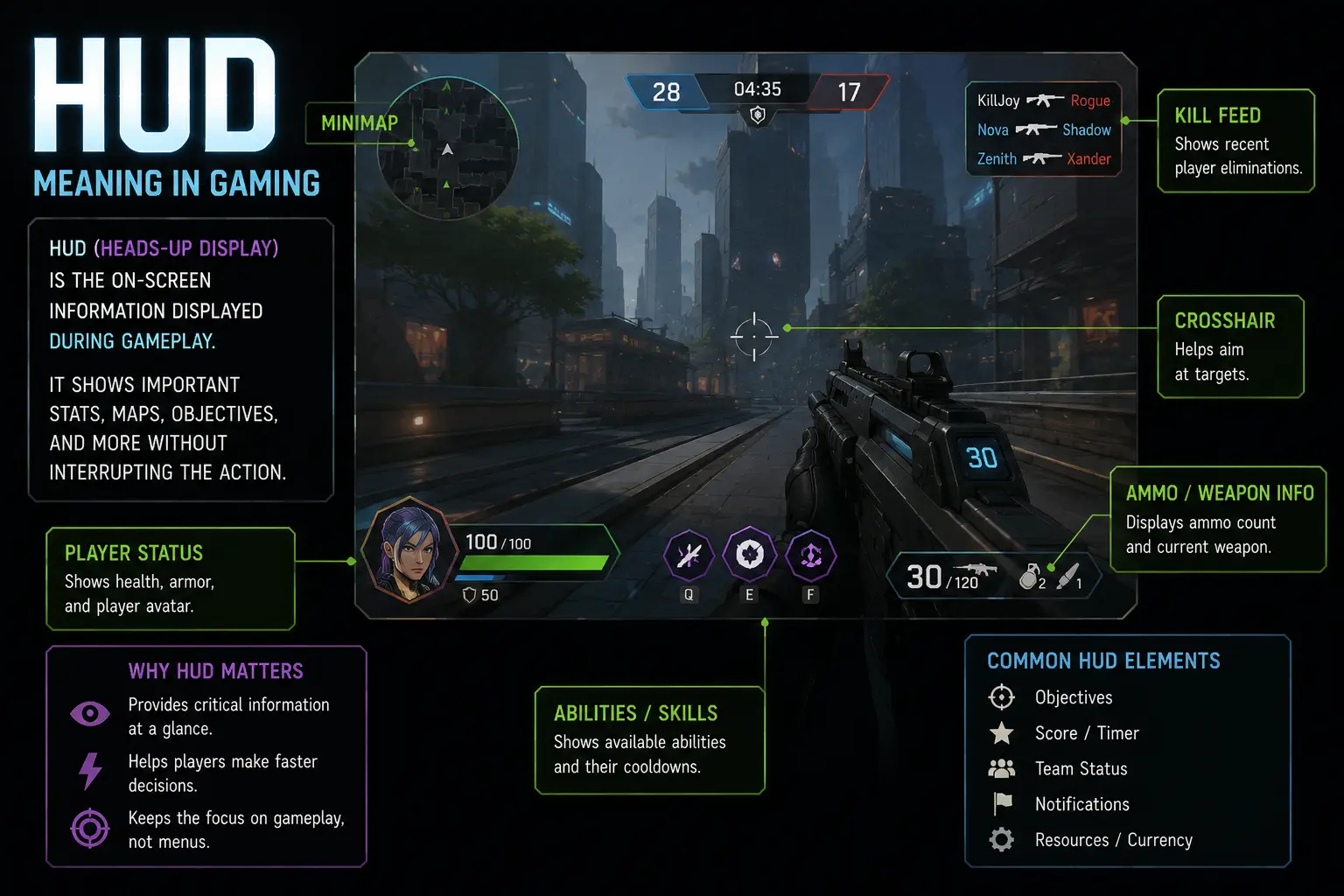
HUD meaning in gaming refers to the on-screen interface that aggregates vital information players need without looking away from the action. It encompasses elements like health indicators, maps, ammo counters, quest objectives, and contextual tips that guide decisions in real time, reflecting HUD display technology in practice. Good HUD design blends readability with minimal occlusion, ensuring players stay immersed while retaining rapid access to important data. Beyond games, HUD concepts cross into simulations and real-world interfaces, including automotive dashboards and augmented reality overlays, where information must be timely and unintrusive. Understanding the HUD meaning and its value helps players evaluate how interfaces affect pacing, strategy, and overall enjoyment across genres.
What HUD Stands For and Its Origins
Understanding what HUD stands for helps explain why those on-screen elements feel so native to modern games. The history behind these displays ties together aviation heritage, arcade innovations, computer graphics advances, and ongoing research into attention management.
- HUD stands for heads-up display, a term borrowed from aviation describing a transparent overlay that presents critical information without requiring eye movement away from the action.
- Early electronic games adopted simple overlays to help players monitor health and ammo, echoing cockpit practices while setting the stage for layered interfaces that followed.
- In gaming, HUD evolved from basic health bars to multi-dimensional panels that include maps, quest trackers, objective markers, and contextual tips that adapt to gameplay.
- The term also informs design principles, prioritizing legibility, minimal occlusion, color contrast, and consistent placement so players can absorb information without breaking immersion.
- Over time, HUD concepts extended to automotive and augmented reality contexts, gradually blending virtual guidance with real-world navigation and safety displays.
Studying these origins also reveals how designers balance legibility with immersion, ensuring information remains accessible without pulling focus away from gameplay. The result is a flexible framework that still adapts to genres, platforms, and even emerging technologies like augmented reality without sacrificing clarity.
Core Components of a Gaming HUD
A gaming HUD is built from core components that must work in concert under varied lighting, fast movement, and different screen sizes. These elements are chosen for durability, scalability, and quick recognition across platforms, ranging from handhelds to large consoles.
- Health bars provide at-a-glance survivability status, often paired with shields or armor meters, designed to be legible in motion while remaining unobtrusive during combat.
- Mini-map or radar keeps players oriented, showing surroundings, enemy positions, routes, and objectives, typically reduced in size to avoid blocking central action.
- Ammunition, resource, or energy counters track available firepower or cooldowns, helping players manage scarce assets while avoiding the need to pause or check external menus.
- Objective trackers display current goals, progress, and waypoints, guiding decisions without overwhelming the player with unrelated data that disrupts pacing.
- Status indicators, notifications, and contextual tips provide real-time feedback about abilities, environment, and risks, enabling quick adaptation without losing immersion.
Designers test readability in action sequences to balance information density with clarity. Ongoing iteration often trades breadth for legibility, ensuring players feel informed without distraction.
Why HUDs Matter: Player Value and UX
A well-designed HUD lowers cognitive load by presenting only what is necessary for the moment, allowing players to react quickly without scanning menus, a practical aim of HUD user interface design.
From a UX perspective, readability, color contrast, typographic consistency, and predictable placement empower players to locate critical data at a glance, improving situational awareness and reducing errors in fast play.
Accessibility considerations such as adjustable text size and colorblind-friendly palettes expand the player base while maintaining the pace and clarity typical of the heads-up display history.
Variations Across Genres (FPS, RPG, Racing, Strategy)
FPS games lean on quick access to survivability data, so the HUD emphasizes health, ammo, a precise crosshair, and a compact minimap that stays within the central field of view.
RPGs expand the HUD to include quest logs, character stats, inventory, and skill cooldowns, balancing tactical data with narrative cues to support exploration and role playing.
Racing games prioritize speed, timing, and positioning, presenting a clean set of indicators such as speed, lap times, and race position that reflect real time performance.
Strategy titles favor macro-level information, with resource counters, fog of war indicators, and broad maps that help players plan multiple moves ahead.
Across genres, the HUD evolves with responsive design, allowing players to toggle layers or customize density to suit playstyle and hardware.
Key Features and Benefits of Our Heads-Up Display
HUD meaning in gaming centers on an on-screen heads-up display that presents critical information without pulling players away from action. In contemporary titles, the HUD typically shows health, ammo, minimap data, quest objectives, resource meters, and status cues that update in real time. A thoughtfully designed HUD supports fast decision-making, precise aiming, and situational awareness while preserving immersion. Designers balance visibility with minimal distraction, choosing color, contrast, and element placement to reduce cognitive load. Beyond games, HUD concepts inform automotive dashboards and augmented reality interfaces, illustrating how perpetual data streams can guide user actions with confidence.
Common HUD Elements: Health, Ammo, Minimap, Objectives
Common HUD elements vary by game, but most titles share a core set that informs quick decisions at a glance.
To help readers compare the most common on-screen elements, the table below highlights core HUD components found in many titles. Each row describes the element, its typical function, where it appears on the screen, and related usage notes.
| Element | Description | Typical Location | Examples / Notes |
|---|---|---|---|
| Health Bar | Represents remaining player vitality; may pulse or color-change at low health. | Top-left or top-center | Appears in most RPGs and shooters |
| Ammo Count | Shows remaining rounds in current magazine and total reserve. | Bottom-right or center-right | Key in FPS and action games; sometimes tied to weapon icon |
| Minimap | Miniature map showing nearby terrain, threats, and waypoints. | Top-right | Often supports zoom, rotation, and radar blips |
| Objectives / Quest Tracker | Lists current goals, progress, and hints to guide play. | Center-right or left | Used in adventure and open-world games |
| Stamina / Resource Bar | Indicates actions like sprint energy or armor/shield status. | Bottom-center | Critical during traversal and combat |
Understanding these elements helps developers optimize readability and players anticipate critical cues during fast-paced play.
As designers refine interactions, they also consider accessibility and genre expectations to ensure players can react efficiently without cognitive overload.
Customization and Accessibility Options
Customization and accessibility options empower players to tailor the HUD to their preferences and visual needs. A strong HUD framework offers scalable text, adjustable element sizes, and flexible placement so the interface remains usable on different monitors and aspect ratios.
Color, contrast, and theme choices are fundamental customization controls. Players may switch between light and dark modes, adjust glow intensity, and tweak element opacity to reduce distraction during intense moments. Full anchoring and drag-and-drop placement let players arrange health, ammo, and maps in a layout that matches their playstyle, whether they favor corners, the center, or a mixed setup. Presets for different game modes save time and ensure consistency across sessions.
Accessibility features are essential for inclusivity and performance. Colorblind options, such as protanopia or deuteranopia simulations, help players distinguish critical cues. High-contrast themes and larger fonts improve legibility for those with reduced vision, while adjustable line heights and letter spacing reduce crowding on small screens. Optional text-only modes or screen-reader compatibility can support players who rely on assistive technologies. Motion-reduction options can lower camera shake or flashing alerts to mitigate sensory overload without sacrificing information.
Beyond basic visibility, designers consider adaptive UI that respects context. For example, nonessential elements may become translucent during combat or fade when nearby threats rise, freeing space for important cues. Keyboard and controller users benefit from clear focus indicators and consistent hotkeys for toggling HUD layers, while cross-platform titles ensure that scaling, layout, and readability remain steady across devices. In shorter, well-tuned HUDs, the goal is to keep essential data accessible without forcing players to memorize complex interfaces or chase information through cluttered screens.
Developers frequently publish documentation or in-game tips describing how to customize the HUD effectively, encouraging players to experiment. Regular playtesting with diverse players helps identify barriers to visibility and ensures features align with real-world usage, not just theoretical design goals.
Reducing HUD Clutter: Best Practices
Reducing HUD clutter benefits both readability and player performance by prioritizing essential cues and minimizing distractions. The core approach is to show only what is immediately relevant and to reveal secondary information only when it matters.
Design strategies include contextual disclosure, adaptive transparency, and persistent but subtle separators that group related elements. Placing frequently used indicators in high-contrast corners reduces eye movement, while secondary data can fade when not needed or when the player is focused on a specific task. Fractional transparency keeps information legible while letting the game world breathe, especially in dense scenes or cramped UI spaces.
Consistency and hierarchy are critical. A clear typographic scale, aligned grids, and uniform color cues help players build fast mental models about what each symbol means. Centralized dashboards should minimize jitter and avoid overlapping counters, and motion-heavy alerts should be restrained to prevent fatigue during long sessions.
Genre considerations also guide clutter management. Competitive shooters often favor lean UIs with essential telemetry, while adventure games may support richer trackers for exploration and questing. In open-world titles, conditional HUDs reveal waypoints only when the player is near relevant objectives, and automatic minimization can occur during cinematic moments. Finally, designers should offer accessibility-based clutter controls, so players can opt into or out of non-critical panels according to their needs.
HUD and Player Performance: Benefits for Skill and Immersion
HUD design directly impacts player performance and the sense of immersion. When critical information is readily visible, decisions are faster and more accurate, especially under pressure or in high-tempo combat.
Clear, prioritized data helps players anticipate threats, manage resources, and execute strategies with confidence. The HUD can also reinforce skill development by coaching players toward optimal routes, weapon choices, and movement patterns through persistent but non-intrusive feedback. Immersion benefits when the display feels integrated rather than tacked on; diegetic or context-aware elements that align with the game world heighten realism and reduce cognitive load.
However, too much data can overwhelm even seasoned players, impairing reaction time and increasing fatigue. Balancing performance goals with comfort requires iterative testing, analytics, and user feedback to tighten the line between informativity and distraction. Esports titles, in particular, benefit from HUDs that deliver fast, reliable cues without creating unfair advantages through excessive detail.
Ultimately, the HUD acts as a training partner, a companion for decision-making, and a bridge to immersion. By embedding intuitive layouts, consistent color cues, and scalable text, designers help players build mental models that translate across games and platforms, sustaining engagement while allowing mastery to flourish.
Technical Specifications and Performance Metrics
HUD meaning in gaming extends beyond a single acronym. Heads-up displays deliver critical information without forcing players to pause the action. The right HUD design guides attention to health, resources, maps, and objectives while preserving immersion. Effective HUDs balance clarity and density, adapting to different game genres and platforms. Understanding technical specifications and performance metrics helps designers craft interfaces that stay informative under varied framerates and hardware capacities.
Rendering Techniques and Engine Integration
Rendering techniques for HUDs intersect with engine pipelines and shader budgets, shaping how overlay elements are drawn, textured, and blended into the frame without stealing focus from gameplay. Choosing the approach requires weighing fidelity against performance, ensuring critical indicators such as health, ammo, maps, and objectives remain legible across a range of resolutions, aspect ratios, and device capabilities.
- Rasterized HUDs constitute lightweight overlays that rely on precomputed textures and screen-space quads, delivering predictable performance while keeping health bars, mini-maps, and ammunition indicators clearly visible during chaotic, fast-paced moments.
- Vector-based HUD elements use dynamic geometry and scalable typography, enabling crisp rendering across resolutions while maintaining legibility, but demanding careful optimization to avoid excessive draw calls and vertex processing.
- Deferred rendering can optimize lighting and blending for glow effects around vital indicators, yet misalignment with post-processing steps or timing can introduce perceived latency if not tightly culled.
- Post-processing and bloom must be calibrated so HUDs remain legible against varied game scenes, avoiding washed-out colors or haloing that reduce contrast and obscure numbers, icons, and dynamic gauges.
- Adaptive scaling and DPI-awareness help maintain readability across devices, guiding designers to select font weights, iconography, and panel sizes that stay consistent when zooming, rotating, or switching between performance modes.
Practically, teams should profile HUD rendering across target hardware, iterating on the layout, and measuring how each component affects frame time, memory usage, and battery drain on mobile devices. Documentation and tooling must map every element to its rendering path, track shader variants, and establish budgets so future updates can scale without destabilizing performance.
Latency, Frame Rate, and Impact on Gameplay
Latency is the delay between a player’s input or an in-game event and the corresponding update appearing on the HUD. In fast action titles such as competitive shooters, real-time strategy games, and racing sims, even small milliseconds can alter perceived responsiveness and the player’s sense of control. Designers map the journey from input handling through the UI event queue to the compositor that finalizes pixels on the screen, then identify opportunities to reduce latency with more deterministic update loops, tighter synchronization, and selective redrawing of critical HUD components. Frame rate, commonly expressed as frames per second, governs how smoothly these updates arrive. A steady 60 FPS is comfortable for most players, but many titles push well beyond 120 FPS on capable hardware, demanding that HUDs scale gracefully. When frame times dip or spike, HUD elements can jitter, blur, or fail to update in time, harming readability during intense moments. To mitigate, teams apply a combination of techniques such as limiting high frequency redraws to essential HUD elements, using stable fonts, precomputing scalable icons, and allocating separate render queues for UI to decouple it from scene rendering. Beyond raw numbers, the impact on gameplay depends on how the HUD communicates information. Clear health bars, concise objective lists, and legible minimaps help players line up actions quickly, while excessive animations or peripheral glow can distract. Developers often profile latency and frame rate under simulated load conditions, evaluate power budgets on mobile, and test across a matrix of devices to ensure consistent perceived performance.
Cross-Platform Considerations (PC, Console, Mobile)
Developing a HUD that works across PC, console, and mobile requires a design language that scales with resolution and input modality. On PC, high-DPI monitors and wide aspect ratios demand scalable vector icons, DPI-aware typography, and flexible panel layouts that maintain legibility when users resize windows or switch between monitor configurations. Consoles often rely on fixed or standardized resolutions with cinematic aspect ratios, so HUDs must preserve clarity with minimal dynamic resizing and consistent calibration across different generations of hardware. Mobile devices introduce tighter power and memory budgets, with diverse screen sizes and touch-based inputs; here, HUDs should emphasize large tap targets, concise indicators, and efficient rendering paths to avoid draining battery while maintaining usability in portrait and landscape modes. Across all platforms, developers must consider accessibility, such as color-blind friendly palettes, high contrast modes, and scalable text. Performance budgets should be defined for each platform, and UI assets should be designed to degrade gracefully under constrained GPU time. Finally, some games include optional world-space HUDs for augmented reality or first-person perspectives, which require careful alignment with camera frustums and real-world scale to prevent visual clutter or misalignment with gameplay geometry.
Testing and Optimization Methods for HUDs
Testing HUDs begins with a formal requirements baseline that defines what needs to be legible at target resolutions and frame rates. Teams implement automated UI tests to verify that indicators render in the correct position, scale appropriately with aspect ratio changes, and update at expected intervals. Profiling tools are used to measure draw calls, texture memory, shader time, and CPU-GPU synchronization, while frame time distributions reveal jitter and glitches that impact readability. A comprehensive testing matrix covers desktop GPUs, mobile devices, and consoles, including low-power modes and battery-limited scenarios. Real device testing complements synthetic benchmarks, capturing perceptual criteria such as perceived latency and readability under motion blur, explosions, or heavy particle effects. QA teams should run regression tests after each HUD iteration, and developers should create lightweight telemetry that records per-component render times, update frequencies, and color contrast metrics across scenes. Finally, A/B testing can help determine whether changes to HUD density, iconography, or color schemes improve decision speed and player satisfaction without sacrificing immersion.
Pricing Plans, Promotions, and Competitive Comparison
The pricing landscape for heads-up display HUD solutions spans free foundations to premium, fully customized setups that power players, streamers, and developers. As the HUD meaning in gaming evolves from simple health and ammo indicators to adaptive information overlays, understanding pricing, promotions, and competitive options helps teams plan budgets and roadmaps. This section compares typical free and paid HUD customization features, explains how marketplaces and promos influence access, and highlights how HUD in video games varies across genres and platforms. Readers will find practical guidance on selecting HUD display technology that fits game design principles and player expectations. By mapping cost versus value, studios can prioritize readability, customization speed, and cross-title consistency while pursuing a sustainable return on investment.
Free vs Paid HUD Customization Features
Free versus paid HUD customization features show how accessibility and depth diverge, guiding players and developers toward the right balance of usability and power.
- Free HUD customization typically covers essential widgets like health bars, minimaps, and basic color themes, allowing new players to tailor visibility without risking wallet drain.
- Paid tiers usually unlock advanced typography options, dynamic layouts, persistent presets, performance optimizations, and cross-game syncing so you can carry a single setup across titles.
- Some premium plans include developer API access for deeper customization, modular HUD components, and real-time analytics that help streamers optimize on-screen information.
- Free options often limit size, color palettes, and dynamic reactivity, pushing power users toward paid packages for extensive personalization and future-proofing.
- For competitive play, paid HUDs frequently provide higher refresh rates, latency reduction, and customizable overlays that reduce eye strain during long sessions.
- Some free plans insist on standard fonts and fixed grid layouts that can hinder readability in smaller windows, whereas premium versions offer adaptive typography and responsive HUD grids.
- Paid options often include cross-title synchronization, cloud presets, and designer-supported customization, making it easier to maintain a consistent look across games and ensure accessibility features are universal.
This framework helps developers balance accessibility for newcomers with power for veterans, while guiding players toward options that align with their playstyle and goals.
Third-Party Mods and Marketplace Options
Third-party mods and official marketplace options open a wide field of HUD customization through community-made overlays, performance-focused tweaks, and ready-to-use presets. User-driven projects on platforms like Steam Workshop or Nexus Mods showcase how accessible HUD components can be adapted for different genres, resolutions, and input methods. Community modding thrives on documentation, compatibility notes, and clear licensing, which helps players balance experimentation with safety and stability. Marketplaces provide curated packages, ratings, and changelogs that guide newcomers toward reliable HUD solutions while helping veterans discover advanced features without reinventing the wheel. Developers evaluating mods should consider integration compatibility, potential conflicts with anti-cheat systems, and the long-term sustainability of community tools across patches.
Comparing HUD Designs from Popular Games
A concise comparison of HUD designs across popular games reveals how readability, information density, and visual hierarchy influence player performance. In fast-paced shooters like Apex Legends and Overwatch, compact overlays with high contrast and targeted telemetry keep focus on action while delivering essential cues. In open-world adventures, designers favor larger, context-aware maps and dynamic quest indicators that adjust to terrain and lighting conditions. Role-playing titles emphasize informative status bars and resource meters that remain legible in dim environments, balancing detail with screen real estate. Strategy games often rely on modular panels and configurable dashboards that let players tailor analytics to their strategies. Across examples, choices about color schemes, font sizes, and animation timing determine how quickly players interpret signals and react.
Choosing the Right HUD for Your Game or Playstyle
To select a HUD that fits your game and playstyle, start by outlining core information needs, such as health, ammo, map data, or mission objectives. Create a baseline layout that prioritizes critical cues with clear typography, high-contrast color palettes, and consistent iconography. Test readability across resolutions, DPI settings, and accessibility needs like color blindness modes and scalable fonts, then adjust density to avoid information overload. Consider whether the HUD should be fixed, resizable, or context-aware, and decide how it should evolve as players progress or switch gameplay modes. Finally, gather qualitative feedback from players and quantify task efficiency to refine overlays, ensuring the HUD remains informative without distracting from the primary game loop.