Latency Meaning and Its Impact on Online Gaming
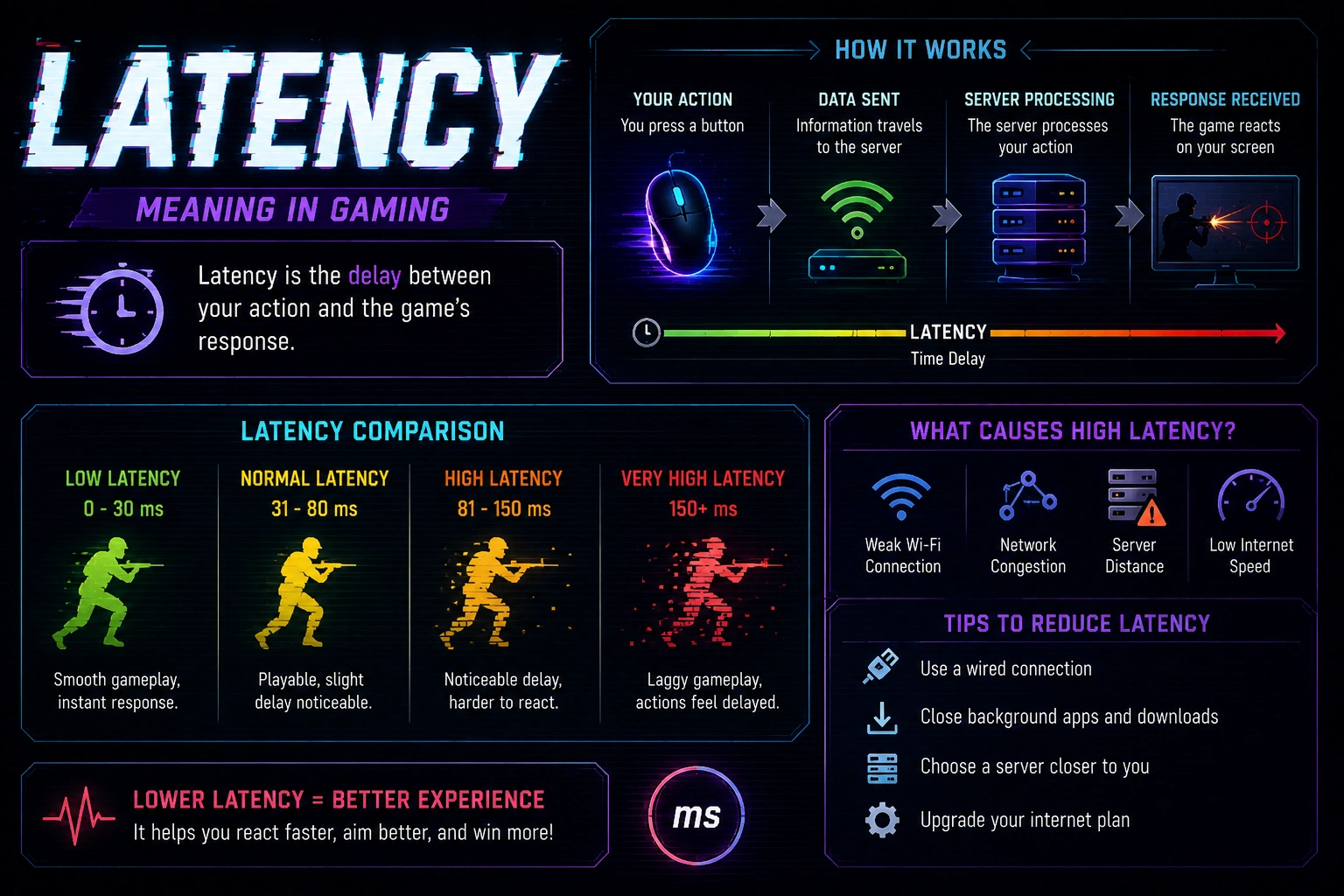
Latency refers to the delay between a player’s action and the game’s response, usually measured in milliseconds. In online gaming, it is commonly described as round-trip time (RTT) because it includes the time it takes for a data packet to travel from your device to the game server and back. This delay is a fundamental aspect of game responsiveness, and even small differences can be felt in fast action titles. Latency is not the same as bandwidth; bandwidth describes how much data can move per second, while latency describes how quickly a single action is acknowledged. Understanding latency helps players diagnose lag, compare connections, and choose strategies to improve responsiveness without changing hardware alone.
What is latency?
Latency is the delay between a player’s input and the game’s reaction, usually measured in milliseconds. In online gaming, it is commonly described as round-trip time (RTT) because it includes the time it takes for a data packet to travel from your device to the game server and back. This delay is a fundamental aspect of game responsiveness, and even small differences can be felt in fast action titles. Latency is not the same as bandwidth; bandwidth describes how much data can move per second, while latency describes how quickly a single action is acknowledged. Multiple factors shape latency. The physical distance to the server matters a lot: the farther you are, the longer the signal must travel. Routing decisions by Internet service providers, the quality of your home network, and the performance of your modem or router all contribute. Server-side load or queuing can add additional delay before your action is processed. Game design choices, such as how often the server updates game state and how much prediction the client performs, also affect perceived latency. Even your own device’s CPU and GPU scheduling can introduce minor delays. Latency is different from jitter and packet loss. Latency is the average delay; jitter is the variability in that delay from moment to moment, which can make timing feel inconsistent. Packet loss happens when some data packets never reach the server or the client, requiring retransmission and causing stutters or missed actions. Together, these factors determine how ‘tight’ or ‘slippery’ a game feels. A low, stable latency leads to consistent input response, while high latency or frequent spikes makes actions appear late, mis-timed, or unpredictable. For players, the practical effect includes delayed hit registration, delayed motion or aiming response, rubber-banding where opponents snap back to a previous position, and longer matchmaking delays as the server fights to reconcile actions. Measuring latency accurately requires using in-game diagnostics or external ping tools, ideally over several gaming sessions and across different servers. Finally, a holistic approach to latency reduction combines network improvements, settings adjustments, and strategic choices about when and where to play to achieve the most reliable performance.
Latency vs. Ping: what’s the difference?
Latency is the overall delay that affects how quickly your actions are reflected in-game and can include several components beyond raw travel time. Ping is a common shorthand for the measurement of round-trip time between your device and the game server, typically reported by games or diagnostic tools. In practice, players often use latency and ping interchangeably, but latency emphasizes responsiveness while ping emphasizes measurement. Other factors such as server processing, rendering, and client-side prediction can contribute to effective latency even when the raw ping appears low. Understanding the distinction helps players diagnose lag more accurately and set realistic expectations for improvement.
How latency affects gameplay and player experience
Latency affects gameplay in several concrete ways, influencing timing and responsiveness across genres. The following points illustrate how latency translates into on-screen behavior and player perception:
- Input delay leads to perceived ‘slow’ controls, making characters feel unresponsive during precise moves like aiming, dodging, or timing a jump.
- Network jitter causes uneven frame delivery, producing stuttery movement or rubber-banding where enemies appear to jump across the screen unexpectedly.
- Packet loss can interrupt critical actions, forcing retries or missing a combo, which frustrates players during fast-paced combat or high-stakes clutch moments.
- High latency can clash with anti-cheat checks, causing occasional adjudication delays that disrupt matchmaking and create perceived unfairness in competitive modes.
- Smaller improvements in latency yield noticeable gains in real-time strategy or shooter genres, where split-second decisions determine victory or defeat.
Together, these dynamics show why reducing latency isn’t just about faster connections—it’s about delivering consistent, predictable input-to-action responsiveness that keeps players in control.
Acceptable latency ranges for different game types
Acceptable latency varies by game type and the level of precision players expect. In fast-paced titles where split-second decisions decide outcomes, even small changes in latency can be noticeable and disruptive. In more forgiving multiplayer experiences, players may tolerate higher delays without feeling systematically disadvantaged. The goal for most players is to keep latency within a predictable range that minimizes abrupt shifts in timing, ensuring matches feel smooth and actions reliably reflect inputs. By knowing typical ranges, players can compare their connections and choose servers or network setups that keep gameplay fluid.
Key Features to Reduce Lag in Online Games
Latency is the delay between player actions and server responses, and it shapes how responsive a game feels. In online titles like fighting games, shooters, and MOBAs, even small delays can impact accuracy and timing. Understanding latency and lag helps players pick latency reduction techniques that boost responsiveness without sacrificing visuals. This section explores hardware, connection types, in-game client settings, and ISP considerations that contribute to smoother gameplay and faster decision making. By combining latency optimization in games with practical network tweaks, players can minimize online gaming latency issues and improve the overall gaming experience.
Network hardware and router settings
Latency is the delay between your actions and how the game updates on screen. It directly affects timing, reaction speed, and how smooth a match feels.
A well configured router and network hardware can lower this delay and reduce lag spikes during critical moments in online play.
| Setting | Effect on Latency | Recommended Value | Notes |
|---|---|---|---|
| QoS (Quality of Service) | Prioritizes gaming packets and reduces jitter | Enable QoS or Game mode | Best on traffic bursts during peak hours |
| Wired Ethernet | Lower baseline latency than Wi Fi | Use a dedicated Ethernet cable (Cat 5e/6) | Eliminates wireless interference |
| UPnP/Port Forwarding | Better server connectivity and reduced NAT issues | Enable UPnP or manual port forwarding | May require router restart after changes |
| Router Firmware | Bug fixes and improved throughput | Install latest firmware from manufacturer | Check for updates monthly |
| MTU and Frame Optimization | Prevents fragmentation and affects packet size | MTU around 1470–1500; test | Adjust with ping tests |
Test changes during a typical gaming session to verify real-world improvements and ensure there are no unintended tradeoffs in other devices.
Connection types: wired vs wireless
Wired connections generally deliver lower latency and greater stability than wireless links, because a physical Ethernet cable provides a direct path to your router with minimal interference. This is especially important in fast‑paced titles where every millisecond counts. However, wired setups can be less convenient, and the quality of the cable, switch, or hub can still influence performance.
Wireless connections offer convenience and flexibility, but are more susceptible to interference from other networks, household devices, and physical distance. Latency on Wi Fi can vary with router placement, channel congestion, and radio standard (for example, 2.4 GHz versus 5 GHz, or Wi Fi 6/6E). If you must play over Wi Fi, prioritize a strong signal, minimize obstructions, and use the shortest, cleanest path from router to console or PC.
In practice, the best approach is to favor a wired link when possible, but if you must rely on wireless, optimize your environment by using the 5 GHz band, enabling a dedicated gaming SSID, and keeping firmware up to date to reduce latency issues.
In-game settings and client optimizations
In-game settings and client optimizations let you tailor responsiveness beyond hardware. Fine-tuning client-side options often yields faster reaction times than hardware upgrades alone. The impact compounds when paired with stable network conditions, turning noticeable lag into only a few milliseconds of delay.
- Enable Limit Frame Rate and set the cap to a stable value that matches your monitor’s refresh rate, preventing dramatic frame pacing, reducing input lag, and keeping motion smooth during intense sequences.
- Choose Fullscreen mode and disable borderless window while gaming to reduce input latency by avoiding desktop composition effects, background redraws, and window focus delays that can interrupt precise timing.
- Limit background downloads and updates, pause cloud sync, and suspend automatic antivirus scans during gameplay to free bandwidth, minimize CPU contention, and protect frame rate consistency in crowded online matches.
- Switch off V-Sync and optimize in-game buffering for lower input lag, then test with your display to ensure tearing is minimized without introducing excessive stutter or performance cliffs during rapid action.
- Enable a dedicated gaming profile on your operating system to prioritize foreground application bandwidth and CPU priority, reducing interruptions from updates, sync services, or background processes that could otherwise spawn latency spikes.
- Keep your drivers up to date for graphics and network adapters to ensure compatibility with modern latency reduction techniques, improve stability, and deliver smoother processing of input and server updates.
- If your system supports it, enable low latency modes in the GPU and OS scheduler to shave additional milliseconds, maintain predictable action timing, and help keep pace with fast tactical gameplay.
Continuously monitor latency displays and adjust settings to maintain the best balance between visual quality and responsiveness.
ISP selection and traffic shaping
ISP choice matters for latency because different providers use distinct backbone routes, peering arrangements, and traffic management policies that influence how quickly your data reaches game servers. When evaluating ISPs, compare not only advertised download speeds but also real‑world latency to the servers you play most often. Look for providers with low jitter and reliable peak‑hour performance to reduce online gaming latency issues.
Traffic shaping, congestion management, and CGNAT can all impact gaming latency. Some ISPs throttle gaming traffic or impose burst caps that create sudden latency spikes. Fiber connections with symmetric upload and download tend to offer the most consistent latency, while cable or DSL may vary with network load. If possible, verify the provider’s routing to popular game servers and ask about peering agreements for gaming content.
Practical steps include asking about low‑latency routes, choosing data centers near your location, and verifying that your connection can maintain stable performance during peak times. Consider a trial period or a service level commitment for gaming if you expect sustained latency improvements, and be mindful of data caps that could indirectly affect throughput and latency over longer sessions.
Performance Metrics and Technical Specifications
Latency means the delay between a player’s action and the game’s response from the server, a key driver of how responsive a title feels, and understanding it is essential for latency reduction strategies. Measuring latency helps you understand whether delays arise on your local network, the path to the game’s servers, or the servers themselves. Together with measures of jitter, packet loss, and throughput, these metrics underpin latency optimization in games and the broader goal of reducing online gaming lag. This section examines measurement tools, explains related metrics, and discusses how server location, tick rate, and matchmaking shape perceived latency.
Measuring latency: tools and commands
Measuring latency is essential for diagnosing where delays originate and evaluating improvements across hardware and connections. The following tools and commands provide quick, actionable readouts that gamers can use without specialized equipment.\n
- \n
- Ping (Windows, macOS, Linux): Send ICMP echo requests to a game server and record round-trip times, revealing baseline latency and how it varies with route changes.
- Traceroute/Tracert: Map the network path to the server, showing each hop’s latency and identifying bottlenecks that contribute to spikes in gameplay delay.
- MTR: Continuous monitoring combines ping and traceroute over time, yielding a live view of latency trends, jitter, and intermittent packet loss.
- PathPing/PingPlotter: Offers per-hop statistics with loss and latency history, helping you identify whether trouble lies inside your network or beyond your control.
- In-game diagnostics: Many titles expose built-in latency meters, server pings, or console commands that provide hands-on, real-time feedback during matches.
- Netflow and bandwidth testing: Run speed tests and monitor upload/download consistency to correlate network quality with spikes in game latency.
\n
\n
\n
\n
\n
\n
Using a combination of these tools gives a comprehensive view of where latency originates, whether from local hardware, your ISP, or distant servers. Regular measurement at different times can reveal patterns, such as peak-hour congestion, that inform when and how to apply latency reduction techniques.
Jitter, packet loss, and throughput explained
Understanding jitter, packet loss, and throughput helps players interpret measurements and target the right aspects of latency and game performance. The table below summarizes what each metric means, typical ranges you might see in online games, and how it affects play.\n
| Metric | What it measures | Typical ranges | Gameplay impact |
|---|---|---|---|
| Jitter | Variation in packet interarrival times | 0-5 ms stable; 5-20 ms moderate; >20 ms high | Unpredictable input timing, inconsistent hit registration |
| Packet loss | Percentage of packets dropped | 0-0.1% excellent; 0.1-1% noticeable; >1% problematic | Rubber-banding, stuttering, missing actions |
| Throughput | Sustained data rate during gameplay | 3-10 Mbps typical for online games; higher for updates/downloads | Insufficient throughput can cause texture streaming delays or lag spikes |
| Latency (Ping) | End-to-end round-trip time | 20-60 ms good; 60-100 ms noticeable; >100 ms poor | Direct impact on core responsiveness and timing windows |
With this context, you can interpret measurements and choose latency reduction strategies more effectively.
Server location, tick rate, and matchmaking impact
Server location matters because geographic distance and interconnection quality shape the initial physical RTT. Choosing a game server geographically closer to you typically lowers the time packets need to travel, reducing overall latency. However, proximity alone isn’t everything: routing paths and peering agreements between networks can route traffic through congested corridors, producing unpredictable delays even to a nearby server.
Tick rate describes how often the server updates the game state each second. In fast-paced games, a higher tick rate (such as 60 Hz or 120 Hz) yields smoother state updates and lower effective input latency, while lower tick rates introduce larger gaps between updates. Client frame rate and server tick rate interact, but perceived latency often tracks the slower of the two. Higher tick rates require more bandwidth and computation, which may yield diminishing returns on networks with limited capacity.
Matchmaking impact focuses on region and server load during the search. If the region is distant because of sparse player populations, you can see higher latency even with excellent hardware. Some titles prioritize region proximity, while others distribute players to balance skill and latency, leading to variability in latency from match to match. In many games you can select regions or servers to optimize for lowest latency, though this may increase queue times.
Practical implications include testing with different servers, confirming NAT and port configurations, and avoiding VPNs unless testing indicates improvement. Monitoring both average latency and variance helps distinguish consistent performance from sporadic lag. When latency is variable, you can apply latency reduction techniques such as optimizing routing, upgrading home networking gear, or enabling QoS settings on routers. Validate changes with measurements across peak and off-peak hours to confirm sustained improvements in game responsiveness.
Offers, Pricing, and Competitive Comparison
Within latency-focused gaming content, readers will find practical guidance on offers, pricing, and how to compare competitive options. This section helps players weigh the cost of gaming routers, subscription services, and ISP plans against the latency improvements they promise. By examining real-world ROI, you can balance upfront hardware costs with ongoing subscription fees to reduce online gaming lag. We break down what to expect for latency reduction techniques and latency optimization in games, so you don’t pay for features that don’t move the needle. The goal is to help gamers choose options that enhance game responsiveness without overspending.
Gaming routers and subscriptions: cost vs benefit
Gaming routers sit at the edge between your home network and the internet, and their value hinges on how well they manage traffic, prioritize gaming packets, and maintain stable connections during peak times. When you assess cost versus benefit, start with the hardware that actually affects latency: a fast CPU, sufficient RAM for QoS processing, reliable wireless radios, and the ability to run current firmware. Features like Quality of Service (QoS), MU-MIMO, tri-band operation, beamforming, and robust port forwarding can reduce jitter and ensure that your game packets stay on the fastest path rather than wandering onto congested routes. A well-configured router often improves both wired and wireless performance, but the biggest gains for online gaming come from prioritizing game traffic, preventing NAT issues, and avoiding competing traffic. Latency reduction techniques generally begin at the router, and a strong foundation here makes any subscription or cloud service work more effectively.
Cost ranges matter when you build a practical ROI story. A solid gaming router might sit in the 100-200 dollar range, offering faster processors, more memory, and better firmware support. High-end models can exceed 250 dollars and provide extras like integrated VPN options, advanced security features, multi-gig WAN ports, and better thermal management for sustained performance. Subscriptions vary from free ISP services to paid plans that promise faster routing, smarter traffic paths, DDoS protection, or game-optimized routes; these typically run a few dollars per month. To assess ROI, convert latency improvements into a simple metric: how many milliseconds you gain in your most played titles and how many times you avoid a lag spike in a typical session. If you compete seriously, even a modest reduction in ping and jitter can shorten decision times and improve consistency, making the upfront cost worthwhile over time. Remember that a stable base connection often outperforms expensive add-ons when the base line is weak.
Performance testing should be your north star. Start by measuring baseline latency to common game servers during typical hours, then configure your router to prioritize gaming traffic and try again. Note changes in ping, jitter, and packet loss, not just frame rate. If improvements are modest, reassess the price tag and look for cost-efficient settings rather than chasing the latest model. Simple steps like placing the router away from walls, using wired backhaul, and ensuring devices aren’t downloading in the background often deliver most of the latency gains.
Comparison of popular low-latency ISPs and services
Low-latency ISPs and services are a key piece of the latency puzzle for online gaming. When you compare options, look beyond advertised speeds and examine how the network handles gaming traffic, jitter, and reliability during peak hours. Some providers advertise lower latency by using optimized routes, dedicated game servers, or peering agreements with major game publishers. The value materializes when those technical choices translate into consistent response times to popular gaming hubs and data centers. In practice, you may experience noticeable differences between a service that prioritizes real-time traffic and one that treats gaming like any other data transfer. For many players, the first metric to consider is the 95th percentile latency during evenings, rather than the raw megabits per second.
Fiber connections typically offer the lowest, most stable latency, with typical home gaming pings in the 5-15 ms range when the route is efficient. Cable can be faster to deploy but often shows higher jitter and congestion, pushing ping into the 15-40 ms range at busy times. DSL and fixed wireless vary even more, with latencies that can spike under load. Cellular 5G home internet can deliver surprisingly low base latency, but mobility, tower handoffs, and network management can introduce variability. When evaluating ISPs, also consider the quality of peering, the number of hops to game servers, and whether the provider offers game-optimized routing or a mode intended to reduce latency. These factors often determine whether you notice fewer lag spikes in competitive titles.
Service features matter as much as baseline speed. Look for low-latency routing, prioritized gaming traffic, and clear information about jitter and packet loss. Some providers publish latency benchmarks to major gaming servers; others leave you to test in your own home. If you share your connection with other households or offices, you may want to ask about traffic shaping policies, data caps, and fair-use rules that could affect gaming during peak hours. A practical approach is to compare two candidates over a two-week trial period, tracking ping to several game servers and the frequency of disconnects. Don’t rely solely on the monthly price; factor in stability, support responsiveness, and the network’s reputation for consistent gameplay quality.
Regional differences are real. A service that shines in one city may underperform in another due to peering choices and infrastructure density. Before committing, verify coverage for your exact address and consult public latency dashboards or user forums to learn typical experiences from nearby players. If you’re choosing between multiple plans from the same provider, start with the lowest-latency path that includes the features you need, such as IPv6 support, mobile hotspot compatibility, or a home network management app. Also weigh the cost of equipment rentals or installation fees that can tilt the long-term value. When it comes to latency reduction for gaming, sometimes the best choice is a direct fiber line to a reputable provider rather than a more affordable, congested route.
Bottom line: to compare low-latency ISPs and services, test actual gaming performance, consider routing and peering quality, and balance price with reliability. The option that delivers the most consistent, predictable ping across your favorite games offers the best ROI for latency-sensitive play.
Budget options and where to save
Budget options can still deliver meaningful reductions in latency if you prioritize the right components. Start with simple, reliable changes before investing in new hardware: a stable wired connection from your modem to your router and from your router to your console or PC. Wired Ethernet dramatically reduces jitter and packet loss compared with wireless in most homes. If you must use Wi-Fi, place the router in a central location, use a clear line of sight, and favor 5 GHz for gaming devices with minimal interference. You can also configure basic QoS rules on affordable routers to prioritize game traffic rather than treating every app the same. These steps often yield a larger per dollar improvement than flashy features on high-end gear.
Smart budgeting for hardware means looking at refurbished or older models that still meet current game requirements. Look for a router with reliable firmware, a capable processor, and enough RAM to handle QoS without slowing down other devices. Check for positive user reviews about stability and heat management; overheating can throttle performance and increase latency. Some budget options include midrange routers from reputable brands that regularly receive firmware updates, which keeps latency-optimizing features current. If you cannot justify a new unit, upgrade one component at a time, such as replacing a single-band extender with a proper mesh node or swapping an aging modem/router combo for a model with better NAT handling and port forwarding. The goal is to squeeze extra latency relief without overspending.
Finally, watch for promotions and bundled deals from your ISP or retailer. A discounted router plus a short-term service plan can provide a clearer path to latency improvements while you evaluate longer-term options.