LAN Meaning: Local Area Network Gaming Guide
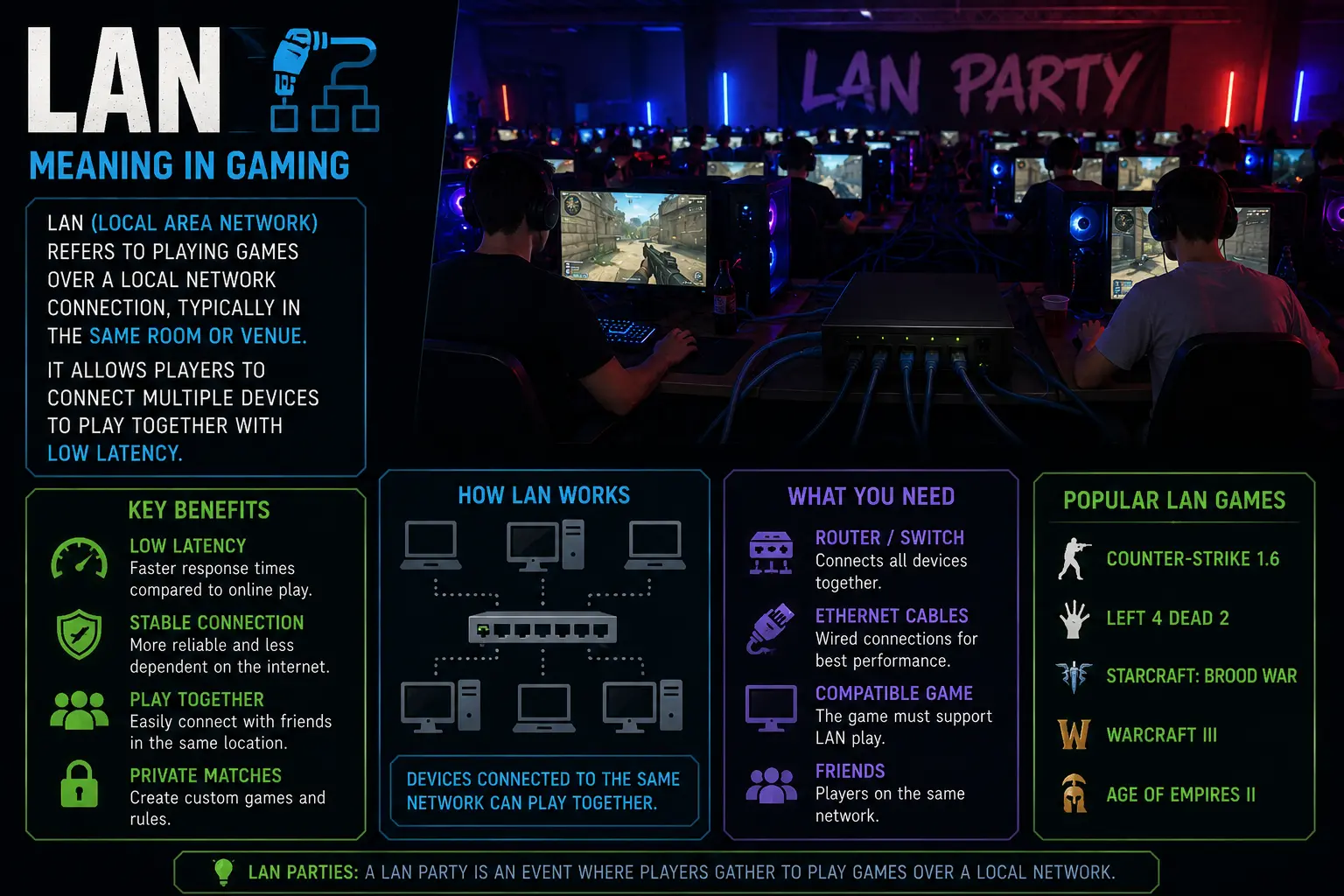
LAN means Local Area Network and in gaming it refers to connecting devices within a defined space—such as a home, dorm, or dedicated venue—to create a private multiplayer environment that operates independently of public internet servers. This local setup gives lower latency, more consistent throughput, and greater predictability because traffic stays on the private network and is routed and prioritized by a local switch or router. Common LAN topologies range from simple home star networks to larger event networks that use managed switches, VLANs, and dedicated game servers to host sessions, manage matchmaking, and minimize interference from other devices. Home LANs focus on affordability and simplicity, while event LANs require robust cabling, power planning, space optimization, and redundancy to support many players and spectators without downtime. Across this guide you will find practical LAN gaming setup tips, connection troubleshooting steps, equipment recommendations, etiquette guidance, and security practices to help you run smooth, competitive local play in any setting.
What LAN Means in Gaming
LAN meaning in gaming is the foundation for real time multiplayer experiences that don’t depend on external servers or internet access. It centers on devices within a bounded area communicating over Ethernet or wireless links to create a private game world where latency is predictable and packet loss is minimized. For gamers this translates into a more responsive experience in fast paced shooters, racing games, fighting games, and co op titles where timing matters as much as aim and strategy. A well designed LAN setup also enables private servers, coach sessions, and friendly tournaments that emphasize skill and teamwork rather than public matchmaking constraints.
Topologies for LAN gaming range from simple home builds to more complex campus or event networks. A home setup typically relies on a central router or small switch, with all devices connected by CAT6 cables or reliable Wi Fi. In contrast, larger gatherings benefit from managed switches, VLAN segmentation to separate groups, and dedicated game servers to handle matchmaking and game state without overloading the main network. The goal is to maintain consistent bandwidth, low latency, and stable connections even as players join or leave, or as downloads and streaming activities occur in the same space.
Key equipment includes fast NICs, cable management that minimizes cross talk, and adequate power distribution with surge protection. Wired connections are preferred for competitive play due to lower latency and more consistent throughput, but a well planned wireless network with dual band access points can work for laptops and mobile devices, especially in larger living spaces. Security should not be ignored; simple measures such as strong local passwords, guest networks, and device isolation help protect players and gear while keeping the focus on game performance. Finally, technicians and organizers should test gear in advance, perform latency measurements, and have spare parts on hand to address issues quickly.
Understanding these elements helps players and organizers optimize setups for reliability and speed across casual sessions, campus events, or larger championships, with a focus on repeatable results and straightforward troubleshooting workflows that teams can apply again and again.
History and Evolution of LAN Parties
LAN parties have evolved from informal gatherings to organized events that blend competition with community building. As gatherings grew, organizers developed standardized rules, match formats, and spectator areas to accommodate larger crowds while maintaining a smooth flow of play. The backbone of any successful LAN is dependable networking, measured in low latency, stable throughput, and predictable behavior under load, alongside clear etiquette and staff coordination that keep sessions progressing on schedule.
LAN parties have evolved from informal gatherings to organized events that blend competition with community building. As gatherings grew, organizers developed standardized rules, match formats, and spectator areas to accommodate larger crowds while maintaining a smooth flow of play. The backbone of any successful LAN is dependable networking, measured in low latency, stable throughput, and predictable behavior under load, alongside clear etiquette and staff coordination that keep sessions progressing on schedule.
These configurations illustrate how small, medium, and large LAN deployments balance cost, complexity, and player experience, guiding decisions about cabling, equipment purchasing, and space planning.
Home LAN Gaming Setup
A home LAN setup prioritizes simplicity and affordability while still delivering solid performance for casual to mid level play. A typical home build uses a reliable router, a modest switch, quality CAT6 cabling, and wired connections where possible to minimize latency. It is important to label cables, keep routes tidy, and plan power distribution to avoid overloading outlets. If space allows, position a small switch near the gaming area and dedicate a single SSID to gaming devices to reduce interference. For wireless on portable devices, choose routers that support dual band operation and enable QoS for prioritizing gaming traffic; regularly update firmware to maintain security. A practical approach is to test latency with simple ping tests and keep spare parts like extra cables and adapters on hand for quick replacements.
Tournament and Event LAN Setup
Event scale LAN setups demand robust topologies, clear cable runs, and careful space planning. Use core and distribution switches with VLANs to isolate groups, ensure redundant uplinks, and provide dedicated game servers for smooth matchmaking. Position equipment in ventilated racks with labeled cables and accessible power, while reserving space for spectators and staff. Provide signed runbooks for staff that describe common procedures for server failure, power interruptions, and match disruption, and keep spare parts on hand for fast recovery. Plan power wisely with dedicated circuits and UPS protection to avoid outages during critical matches, and establish a simple on site help desk to troubleshoot technical issues quickly.
Common LAN Setups and Devices
Common LAN deployments vary by scale and purpose, and understanding the trade offs helps planners design networks that deliver low latency, stable throughput, and manageable administration. In a home or dorm setting, simplicity and cost often trump high capacity, while event environments demand scalability, redundancy, and rigorous cabling discipline. The table below summarises typical examples, highlighting the topology, devices, and expected latency characteristics that influence how players perceive the game experience.
| Setup | Topology | Typical Devices | Latency/Throughput |
|---|---|---|---|
| Home LAN Gaming Setup | Star topology around a router or small switch | Router, gigabit switch, NICs, CAT6 cabling, consoles, and a NAS for backups | Low latency 1–5 ms; Up to 1 Gbps per link; jitter minimal |
| Small Office/Dorm LAN | Centralized switch with VLAN capable router | Managed switch, access points, NAS/storage, multiple PC/workstations | Moderate latency 5–15 ms; Throughput up to 1 Gbps per user |
| Event‑Scale LAN | Layer 2/core switches with VLANs and trunking | Core/aggregation switches, many access points, game servers, racks | Low 2–8 ms latency; High fabric throughput (10–40 Gbps) |
These configurations illustrate how small, medium, and large LAN deployments balance cost, complexity, and player experience, guiding decisions about cabling, equipment purchasing, and space planning.
Key Features and Benefits of LAN Gaming Solutions
Local area network (LAN) gaming solutions bring players together with fast, stable connections that stay within a home, school, or event environment. By keeping traffic local, LAN eliminates the typical congestion and fluctuations seen on public networks, resulting in consistent frame rates and smoother multiplayer experiences. These setups leverage dedicated hardware, reliable switches, and shared bandwidth to minimize disruptions during intense matches. For event planning or classroom use, LAN gaming solutions offer predictable performance, easy setup, and clearer communication between players. Understanding their key features helps players choose the right equipment and best practices for reliable local play.
Low Latency and Reliability
Local area networks designed for gaming emphasize minimizing round trip times and jitter to keep action responsive and predictable. A well architected LAN uses quality cabling (Cat6 or better), modern switches with sufficient backplane capacity, and correctly configured network devices to ensure data packets arrive in time for decision making rather than after the reaction. Central elements include dedicated gaming switches with quality of service (QoS) settings that prioritize latency sensitive traffic such as real time inputs, pointer data, and voice chat, while preventing bandwidth hogs from other devices from introducing delay. To maximize reliability, administrators implement separate VLANs for gaming traffic, apply strict port rules to prevent unnecessary broadcast storms, and ensure that the uplink to the core router has redundancy or fast failover. I find that fixed topology designs, avoiding daisy chain layouts where possible, and favoring star configurations with stable uplinks reduce the risk of loops and contention that can happen in ad hoc cabling. Additionally, using static IP addressing or reserved DHCP ranges helps keep sessions stable and makes it easier to manage server discovery and matchmaking locally. When possible, developers and event organizers should operate a dedicated LAN game server or host local peers with a minimal number of hops between client devices to reduce added latency. Regularly verifying cable integrity, updating firmware on switches, and testing connectivity under simulated peak demand conditions help identify bottlenecks before they affect players. Many modern gaming titles also support direct peer to peer connectivity in local networks, but even in those setups the underlying LAN remains the critical backbone for timely packet delivery. Finally, teams should document standard operating procedures for setup and troubleshooting, including common failure modes, to speed up onboarding for players and reduce downtime during tournaments.
Security and Privacy Benefits
Security and privacy are foundational advantages of closed local networks that enhance the safety of multiplayer sessions. A closed LAN simplifies enforcement of access rules and monitoring. With traffic contained within a trusted environment, administrators can enforce strict access controls and monitor activity without the noise and ambiguity of the broader internet. A LAN setup supports centralized authentication, allowing only known devices and players to join, which simplifies auditing and reduces the risk of rogue connections. Firewalls, VLAN segmentation, and per session guest networks give operators control over who can see or interact with game data, while still preserving low latency and fast connectivity for legitimate players. Together, these measures create a more predictable and auditable environment, making it easier to enforce fair play, protect sensitive information, and rapidly respond to potential threats.
Cost and Resource Efficiency
Running games over a local network can substantially reduce ongoing costs compared with cloud based or online only options. Once the initial investment in reliable switches, cables, and a solid router is in place, most subsequent sessions incur minimal per hour expenses since there is no recurring licensing or data transfer fees from external providers. LAN setups also enable hardware reuse and centralized management, allowing departments or families to leverage existing PCs or consoles without renting server side resources. Energy consumption tends to be lower than streaming game services that push data to remote servers continually, which translates into lower electricity bills for a gaming event or household. Maintenance overhead is often simpler, with localized troubleshooting, straightforward firmware updates, and easier replacement of failing components. When scaled properly, LAN gaming can offer a cost effective alternative to cloud reliant multiplayer experiences while delivering dependable performance and faster support during tournaments or practice sessions. Choosing hardware with headroom—such as switches that support 1 Gbps per port or higher and NICs capable of low interrupt rate—helps ensure headroom during large matches. In practice, performance testing should include measurements of RTT, jitter, and packet loss across multiple devices under simulated peak load. It’s also important to consider the physical layout of the network, with central patch panels, clearly labeled cables, and minimal cable runs to reduce interference and latency. Power stability factors, including surge protection and uninterruptible power supplies, help prevent performance dips during storms or outages. Finally, training players and technicians on basic networking concepts, such as how to forward ports for specific games or how to reboot an unresponsive device without disrupting other participants, can reduce downtime and improve the overall experience.
Specifications, Performance, and Networking Benefits
LAN gaming delivers a consistently reliable, low-latency experience by keeping traffic within a local network. This section breaks down the key specifications that influence play quality, from bandwidth budgets to jitter tolerances. You will see how to measure these metrics, interpret them, and optimize your setup for both home sessions and larger LAN parties. By aligning hardware, software, and player etiquette with tested networking practices, you can create a resilient environment that minimizes interruptions and maximizes responsiveness during competitions.
Network Specs: Bandwidth, Latency, and Jitter
To plan for smooth play in a LAN environment, focus on bandwidth, latency, and jitter as the core metrics that determine responsiveness. The table below translates typical home ranges into targets that support multiple players on a single network.
| Metric | Typical Home Range | Target for Smooth Play | Notes |
|---|---|---|---|
| Bandwidth (Mbps) | 3–8 | 15–25 | Per device; ensure headroom for updates and background traffic. |
| Latency (ms) | 1–15 | ≤ 5 | Lower is better; wired connections preferred; minimize hops. |
| Jitter (ms) | 0.5–2 | ≤ 0.5 | Stability matters; avoid wireless interference. |
| Packet Loss (%) | 0–0.1 | 0 | Even tiny losses can create stutter in action games. |
| Concurrent Players | 2–6 players | 8+ players | LAN party scale; plan for future growth. |
Interpreting these values helps you identify bottlenecks quickly, whether it’s a crowded switch, a long cable run, or interference from nearby networks. In practice, keeping wired connections and proper QoS configuration yields the most consistent experience for LAN gaming sessions.
Hardware and Software Recommendations
Selecting the right hardware and software sets the foundation for a reliable LAN experience. The following recommendations cover equipment commonly used in home setups and at LAN parties, emphasizing reliability, ease of use, and clear documentation.
- High-quality gigabit router with built-in Quality of Service (QoS) for prioritizing gaming packets, plus IPv4/IPv6 support and straightforward management interfaces.
- Managed switch with gigabit ports, VLAN or port-based QoS, and optional stacking to keep a growing LAN clean and scalable.
- Network Interface Cards (NICs) designed for low latency and interrupt minimization; connect directly with wired Ethernet to maximize throughput and consistency.
- Useful software for monitoring and optimization: NIC drivers, router firmware updates, and lightweight network analyzers that reveal congestion, latency spikes, and misconfigured QoS rules.
- Cables and physical layout: shielded Cat6/Cat6a cables, proper routing, minimal length, and avoiding daisy-chained hubs to preserve signal integrity and reduce interference.
Pair these with up-to-date firmware, regularly refreshed drivers, and lightweight monitoring to maintain optimal performance. A well-chosen kit reduces troubleshooting time and helps you scale from a small group to a full tournament with confidence.
Troubleshooting Performance Issues
Performance issues on a LAN often arise from a mix of physical, network, and host factors. Begin with the physical layer: inspect all cables for wear or damage, replace questionable links, and confirm every device is connected to a modern, gigabit-capable switch. Run a baseline test by pinging the game host from another device on the same network to measure round-trip time and jitter, noting any spikes. If latency remains volatile, check for crowded switches or routers, and inspect background tasks that may consume bandwidth such as software updates or cloud backups. Next, examine the network path: perform traceroutes to the game server or host to identify unnecessary hops or failing links, and verify there are no congested ports or misrouted traffic. If congestion is confirmed, implement QoS rules to prioritize gameplay traffic and restrict nonessential services during match windows. Then review endpoint performance: ensure gaming PCs or consoles have the latest drivers, sufficient CPU and memory headroom, and that antivirus scans or file indexing are not running during play; adjust power settings and startup programs to minimize background load. Address wireless variables: if any devices rely on Wi‑Fi, prefer 5 GHz with clear channels and minimal interference, or switch players to wired connections for critical rounds. For dedicated game servers or hosting setups, confirm server capacity aligns with expected player count, monitor port-forwarding rules, and verify that local DNS resolution remains stable. Finally, maintain a routine of firmware updates for routers and switches, keep NIC firmware current, and document configuration changes so you can reproduce successful setups for future LAN events.
Pricing, Offers, and Availability
Pricing, offers, and availability shape every LAN gaming session, from a casual home setup to a multi-station tournament. Understanding the costs of a LAN gaming setup, where to buy or rent LAN equipment, and how to spot value helps organizers keep plans on track and players happy. This guide highlights LAN party tips, server setup considerations, and how to balance performance with budget. By mapping hardware needs to expected traffic and space, you can align equipment, venue costs, and concessions while maintaining a strong community experience. Whether you aim for a lean, value-driven home event or a larger LAN tournament strategy, clear pricing and availability data keeps your LAN gaming community engaged and resilient.
Typical Costs for LAN Setups and Events
Typical costs for LAN setups and events vary by scale but generally cluster into three tiers: home two to four station configurations, small community gatherings, and larger multi station LAN parties. For a two station home LAN, the biggest investment is the hardware and displays; a mid range gaming PC typically runs about 700 to 1,200 dollars per station, while monitors run roughly 150 to 300 dollars each and peripherals such as keyboards, mice, and headsets add 60 to 150 dollars per unit. If you already own parts of your setup, the incremental cost drops to a few hundred dollars, mainly for extra cables, a compact network switch, and additional power protection. For a four station home upgrade you will likely need a bigger switch with 8 to 16 ports, longer Cat6 runs, and a shared power strip or UPS; this combination can push the incremental per station cost to about 120 to 250 dollars depending on quality and whether you buy refurbished gear. In practice you should also account for seating and furniture upgrades to maintain comfort; budget roughly 100 to 250 dollars per chair and 50 to 150 dollars per desk, with the total depending on brand, ergonomics, and your space. When you scale to a small event or LAN party you would add a larger network backbone, a couple of access points for redundancy, extra power distribution units, and more extensive cable management; a four to eight station event can require a 16 to 24 port switch in the 100 to 300 dollar range and cables or adapters at 20 to 40 dollars per station, depending on whether you use shielded or unshielded cables and whether you route runs in walls or under desks. In addition to hardware, you should budget for venue related costs if you plan to run a one day or multi day event; venue rental can range from a few hundred to several thousand dollars based on location, room size, and whether amenities like a projector or stage are included; tables and chairs may cost about 15 to 40 dollars per seat and 50 to 150 dollars per table; food and beverages for participants can run another 5 to 20 dollars per person per meal, depending on the level of catering you offer. IT labor for setup, testing, and on site support is another factor; you can rely on volunteers in smaller events or allocate 100 to 500 dollars for a contractor or tech lead for larger gatherings. Software licenses typically represent a smaller slice of a LAN event budget, unless you book a tournament with premium entry fees or specialized management tools, in which case you could see additional costs; still, many entries rely on free to play games or titles you already own to keep costs predictable. The total cost picture ranges from a lean two station home arrangement under a thousand dollars when you maximize reuse and keep hardware on hand, to a modest four station home setup in the one to two thousand dollar range, and up to several thousand dollars for a formal small community LAN party with rentals, staffing, and a venue. Larger events that rely on vendor rentals, stage setups, streaming equipment, and comprehensive network infra tend to exceed ten thousand dollars; in such cases it is common to use sponsorships, vendor deals, and ticket sales to offset costs. It is always wise to build a contingency into your budget for unexpected issues such as hardware failures, cabling damage, or power fluctuations that can derail a match; a ten to twenty percent cushion is a sensible rule of thumb for most organizers. The numbers above are intended as a rough guide rather than fixed quotes and will vary by region, vendor, and timing; they provide a realistic framework for planning LAN gaming equipment purchases, rentals, and upgrades, helping you make informed decisions that align with your event goals, your community expectations, and your long term LAN tournament strategy and LAN gaming challenges.
Where to Buy or Rent LAN Equipment
Where to buy or rent LAN equipment begins with evaluating your scale, location, and timeline. For new gear, look to major electronics retailers and computer hardware stores for switches, routers, Cat6 cables, power management, and per station peripherals; manufacturer direct purchases can also offer warranties and bulk discounts for multi-station setups. Refurbished gear is a viable option when backed by warranties and tested performance metrics, especially for switches and routers where reliability matters; many reputable refurbishers provide clear return policies and service histories. Online marketplaces and reseller programs can help you compare prices quickly, but always assess seller ratings, shipping timeframes, and after sales support. For event rentals, specialized LAN party suppliers offer complete packages that include networking gear, cables, tables, power distribution, and on site tech support, which can be a lifeline for one off events or when you want predictable upfront costs. When comparing purchases or rentals, include total cost of ownership, delivery fees, setup support, and the ease of replacement if a piece of gear fails on site. If your schedule includes multiple events, negotiate bulk discounts or loyalty terms that cover wear and tear, warranty extensions, and prioritized service windows. In addition to hardware, you will likely need cables, cable management accessories, furniture rentals, and basic IT tools; request a detailed bill of materials so you can budget accurately. Depending on your locale you may find community spaces, universities, and local clubs that lend gear for events, which can help you test gear before you buy and strengthen ties with the local LAN gaming community.
Tips for Budget-Friendly LAN Gaming
Budget friendly LAN gaming starts with a clear plan and a ruthless eye for value. Begin by auditing what you already own and identify items that truly need replacement rather than upgrades for every event. Reuse monitors, keyboards, mice, and headsets across stations and borrow a few extra displays when possible to reduce upfront costs while preserving a quality experience. Seek refurbished networking gear with warranties; an 8 to 16 port switch can offer ample headroom at a fraction of the cost of new equipment if it has been tested and verified. Favor free to play games or titles you already own to avoid licensing expenses, and consider open management tools to handle brackets, schedules, and streaming. Look for bundle deals from retailers and manufacturers that include switches, cables, power distribution units, and service plans to simplify setup and support. For events, a hybrid approach often saves money: use existing infrastructure for lower demand matches and reserve higher performance stations for the most popular games. Sponsorships, volunteers, and donated hardware can offset costs and also strengthen ties with the LAN gaming community. Optimize your network design to avoid over provisioning; in small LANs a single robust switch with clean cabling and wired connections is typically more reliable and cost effective than distributing gear across many sub networks. Build in a contingency, since cables fail and switches can degrade under load; a modest cushion of ten to twenty percent helps cover replacement parts and on-site misfires. The aim is to balance performance with affordability while maintaining an inclusive, welcoming environment for players, coaches, and spectators, and to share practical LAN party tips and best practices for LAN connection troubleshooting, security, and etiquette with your community.