ESP Meaning: Cheats and Hacks Explained – Product Overview and Benefits
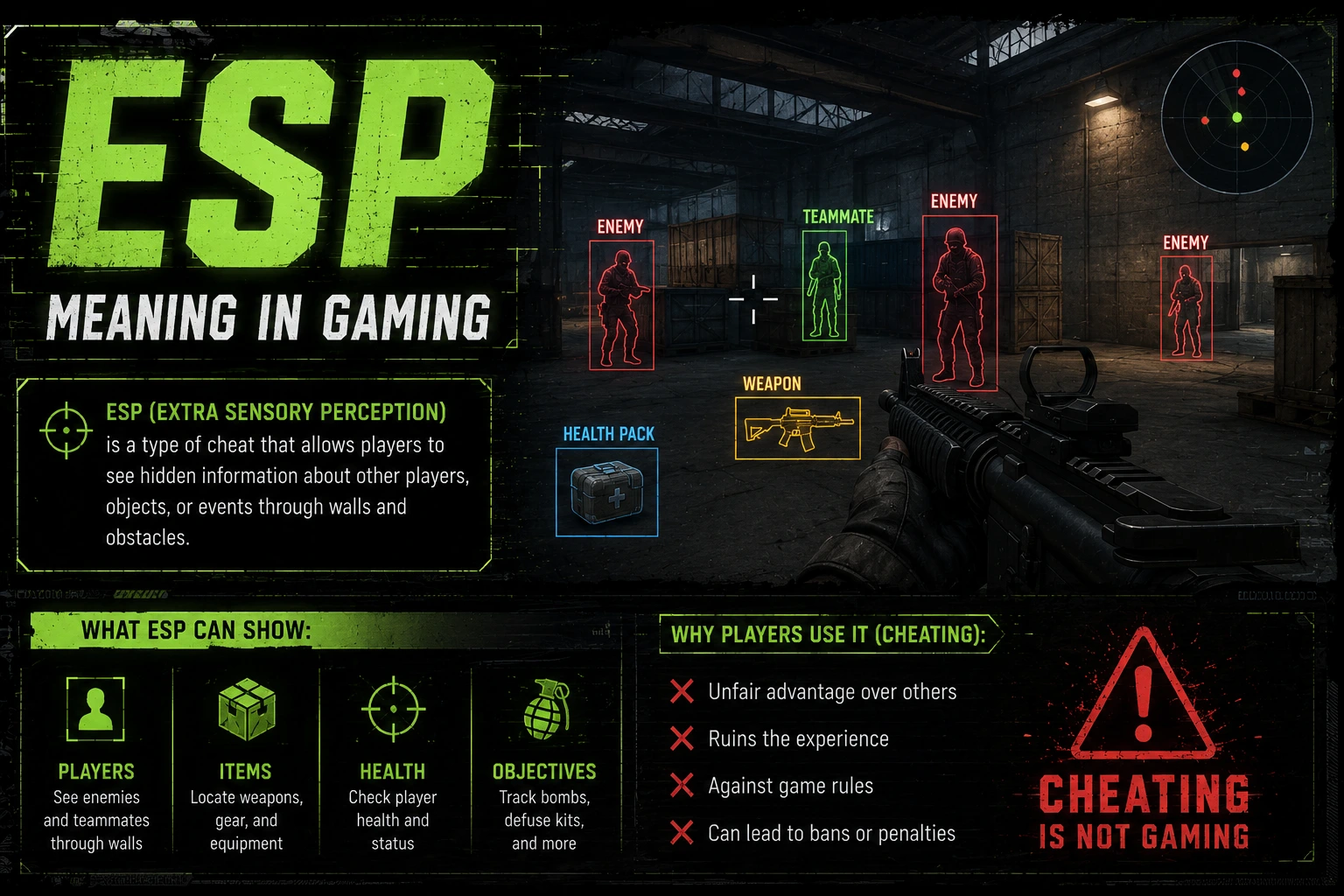
ESP, short for extrasensory perception in gaming, refers to tools that reveal hidden information such as enemy positions, item drops, or objectives through walls or the map.
In online multiplayer, ESP is commonly classified as a cheat or hack because it provides an unfair advantage and is prohibited by most platforms.
This section clarifies the ESP meaning in gaming, outlines common forms, and contrasts illegal cheats with legitimate gameplay practices.
Understanding ESP means recognizing how it is used, why players seek it, and the penalties that can follow if detected by anti-cheat systems.
We also discuss its potential impact on fair play, competitive integrity, and the broader gaming community.
What ESP Means in Gaming
In gaming jargon, ESP means more than a single feature; it describes a family of tools designed to reveal information that is normally concealed during matches. At its core, ESP aims to provide players with a clearer picture of the battlefield by exposing enemy locations, movements, health indicators, and sometimes resource placements that would not be visible through standard sightlines.
Different ESP implementations package these capabilities in ways that appeal to players and learners. Features commonly described include wall visibility through obstacles, color coded outlines to distinguish opponents, radar or minimap reveals, and data overlays that show distances or status effects. Some tools also display numeric data such as health, shield, ammo, or cooldown timers, which enthusiasts often cite as training aids and performance feedback.
Because ESP intersects with what developers consider unfair advantage, it sits at the center of debates about fair play and sportmanship. In most online titles, ESP falls under cheating or misuse of third party software, and it is routinely banned by anti cheat systems and platform policies. Even when used in private practice modes or on non competitive servers, legality and acceptability depend on the game and on community norms.
The practical impact of ESP is complex. On one hand, ESP can speed up learning, help players understand game mechanics, and allow repetitive testing of map layouts in controlled contexts. On the other hand, it can erode the challenge that makes competitive games compelling, damage trust among players who do not use such tools, and invite a cycle of countermeasures and penalties that harms the broader community.
To navigate these tensions, many studios advocate for sanctioned training features or spectator modes that provide clear visibility for practice while preserving competitive integrity. Understanding the ESP meaning in gaming requires balancing curiosity about how cheats operate with a commitment to safe, fair play and to following the rules established by developers and leagues.
Within the umbrella of ESP, several feature sets recur across titles. Wallhacks highlight enemies through geometry, glow or outline systems differentiate targets from terrain, and radar or map overlays extend awareness beyond line of sight.
Data overlays may present per target metrics such as health and distance, and map knowledge can be enriched by indicators that reveal spawn points, patrol routes, or objective timers.
How ESP Works: Common Methods
ESP works by three broad approaches, each with trade offs in performance, accuracy, and detectability. Understanding these categories helps explain why ESP is both appealing to players and concerning to developers.
Overlay-based ESP is one common method, where an external program draws information on top of the game screen. This can be implemented as an injected interior overlay or as an external tool that hooks into the display pipeline. The result is on-screen indicators that appear to coexist with the game’s own graphics, sometimes without altering game files.
Memory reading and memory injection describe another family of techniques. Tools in this category attempt to read the game’s internal state, such as enemy coordinates, health values, or objective statuses, and then present that data to the user. Because this approach manipulates the game’s memory or code paths, it is frequently targeted by anti-cheat systems and can carry substantial risk for the user.
Direct rendering modifications and shader changes alter how the game draws objects, applying outlines, glow effects, or color shifts to enemy models. While visually striking, these methods rely on deep integration with the game’s rendering pipeline and can trigger anti-cheat detections if used in competitive environments.
Image recognition approaches attempt to infer information by analyzing frames, textures, or game UI elements. These methods are less common but illustrate the breadth of techniques used to extract data without direct memory access. Across all methods, the common thread is a balance between data availability, software stability, and the likelihood of detection by anti-cheat mechanisms.
From a risk perspective, most ESP implementations carry a non-trivial chance of being detected, resulting in penalties such as account bans or hardware bans. Users should also consider the security risks of downloading third party tools, which may harbor malware or unauthorized data collection habits.
Benefits of ESP and Why Gamers Use It
For some players, ESP features are touted as helpful in training, learning, and understanding game state, though they carry substantial risks and ethical concerns.
Enhanced situational awareness that surfaces enemy positions, movements, and raiding patterns helps players anticipate threats and coordinate team strategies more effectively during tense matches.
Faster reaction planning by providing real-time cues about opponent locations and likely angles reduces uncertainty and enables quicker decisions under pressure.
A valuable practice and learning tool lets players observe patterns, test strategies in controlled environments, and evaluate map knowledge without relying solely on memory.
Competitive benchmarking and telemetry insights allow players to compare performance across sessions to discover areas for improvement and training focus without compromising fair play.
Accessibility and inclusivity provide opportunities for players with visual or cognitive impairments to understand game state and practice decision-making in a more approachable way.
However, these benefits come with caveats. ESP can undermine competitive integrity if used inappropriately, and it may incentivize a reliance on external aids rather than genuine skill development. Communities and developers frequently push back against unrestricted ESP use to protect fair play and the long-term health of competitive ecosystems.
Risks, Fair Play, and Consequences
The use of ESP tools in most online games raises significant ethical and practical concerns. Cheating tools violate terms of service and community norms, and many platforms reserve the right to enforce penalties including temporary suspensions, permanent bans, or forfeiture of accounts and progress.
From a fairness perspective, ESP undermines equal opportunity to compete, erodes trust among players, and can trigger a broader cycle of countermeasures, legal actions, and reputational damage for individuals and communities involved.
Security risks are also a major consideration. Some ESP software is bundled with malware, spyware, or adware that can compromise personal data or hardware, especially when downloaded from unreliable sources. Users who value privacy and device safety should be cautious about the provenance of any third-party tool.
To mitigate these risks, many developers advocate for sanctioned training options, official spectator modes, and built-in practice environments that offer safe visibility without giving unfair advantages in live matches. If a game explicitly prohibits third-party ESP tools, the prudent choice is to refrain from using such software and to pursue regulated practice modes that preserve competitive integrity.
Ultimately, understanding the ESP meaning in gaming involves recognizing the tension between curiosity about how cheats operate and a commitment to fair play, legal compliance, and respectful participation in the broader gaming community.
Features and Technical Specifications of ESP Meaning
ESP meaning in gaming often refers to tools that reveal hidden information such as enemy positions and item locations. In practice, ESP can be implemented through various UI overlays and data extraction methods, which range from simple on screen indicators to more complex visualization systems. For players, ESP promises an edge by showing through walls and around corners, but it is widely banned in competitive games. This section explores the key features and technical underpinnings of ESP meaning in gaming without encouraging misuse. We also consider the broader context including anti cheat measures and the ethics of using such tools.
Common ESP Features and Functionality
Below is a concise breakdown of the features gamers commonly look for when evaluating ESP tools.
- Enemy outlines and glow effects that highlight opponents through walls and obstacles, often color coded by threat level to aid quick recognition during fast paced matches.
- Item and objective revealing to show weapon spawns, money bags, or mission objectives in the map vicinity, helping players prioritize targets and resource collection.
- Team and ally information overlays provide names, HP bars, and location hints to support coordination, while balancing fairness concerns in group play.
- Distance indicators, range rings, and field of view markers translate raw data into intuitive cues, reducing cognitive load during engagements.
- Customization options allow you to tailor visibility levels, color schemes, and alert methods to fit personal preferences and reduce eye strain during long sessions.
Understanding these features helps players assess the potential impact on fairness and gameplay balance.
Enemy outlines and visibility
Enemy outlines and visibility helpers are designed to make opponents easier to spot, often by rendering a glow border or an embedded highlight that remains visible through walls. This reduces visual ambiguity in tense encounters and can give players an early warning about incoming threats. However, this feature raises fairness concerns in competitive games and is one of the primary reasons such tools are banned on most official servers. Understanding its mechanics helps explain its impact on balance.
Loot and Objective Highlighting
Loot and objective highlighting refers to the practice of marking weapon drops, armor, money bags, or mission goals to make them easier to locate during a match. With pings and glow effects, players can prioritize resource collection and strategic points without exhaustive searching. While this can speed up gameplay for new players, it can also skew competitive dynamics by funneling attention to high value targets. The feature is often bundled with other ESP components and carries ethical considerations.
Team Coordination Overlays
Team coordination overlays display ally positions, health status, and targeted callouts to support group play. When used responsibly, these overlays can improve communication and reduce misplays in chaotic engagements. However, they also enable information asymmetry if used to reveal hidden teammates or to bypass fog of war in ways not intended by the game. The result is a tension between cooperation benefits and the risk of unfair advantages.
Proximity and Range Indicators
Proximity indicators translate distance and relative position into intuitive cues such as rings or color changes. This helps players gauge engagement windows and retreat options with less mental load. In practice, range cues can reveal threats that would normally require more careful tracking and map knowledge. Some communities argue these aids undermine skill development, while others see them as accessibility enhancements.
Display Customization and Accessibility
Display customization options allow users to adjust visibility levels, color schemes, transparency, and alert methods to fit personal preference and reduce eye strain. Accessible settings can make it easier for players with visual impairments to participate. At the same time, such customization can complicate fairness assessments if unevenly applied across players. The overall impact depends on how the features are implemented and enforced within a given game.
Technical Implementation: Memory Reads, Overlays, and Injection
Technical implementation in the context of ESP means understanding a range of approaches used to access game data and present it to the user. External tools may render overlays by interacting with the operating system’s graphics stack, while internal solutions can rely on hooks or APIs to obtain visual state. In both cases the goal is to translate live game information into a visual representation that is easier to interpret during fast paced play.
Memory reads refer to observing values stored in a game’s memory space such as positions, health, weapon state, and objective markers. Overlay rendering translates those data points into on screen indicators that highlight enemies, items, or points of interest, potentially through color coding or shapes. Injection describes techniques that allow code to run inside or alongside the target process; discussions about this topic emphasize legality, safety, and the risk of destabilizing the game rather than providing actionable steps.
It is important to note that real world usage of these techniques typically occurs in benign contexts such as debugging tools, accessibility features, or game analytics. When discussing ESP in a general sense, one must consider platform restrictions, game patch cycles, and anti cheat measures that continually evolve to protect fair play. Developers and researchers who study these areas focus on responsible disclosure, community guidelines, and compliance with terms of service rather than creating or distributing tools that undermine those rules.
Overall, the technical landscape around ESP meaning in gaming is complex and dynamic. The practical takeaway is that overlays and data extraction exist on a spectrum from harmless debugging or educational uses to tools that violate game policies. Understanding this spectrum helps frame conversations about fair play, safety, and the ongoing efforts by developers to safeguard competitive environments.
Detection, Anti-Cheat, and Evasion Techniques
Below is a high level comparison of detection methods and countermeasures used by modern games and anti cheat systems.
| Method | What it detects | Limitations | Ethical/Practical Considerations |
|---|---|---|---|
| Signature-based detection | Known ESP tools and plugins with identifiable binaries or patterns | Custom or obfuscated variants can bypass; updates may lag | Privacy and software stability concerns |
| Memory scanning | Memory patterns and hooks that implement overlays or data extraction | Performance impact; risk of false positives | Potential collateral damage to legitimate software |
| Behavior analytics | Unusual input patterns or suspicious targeting or movement | Can be manipulated and may misclassify players | Fairness and transparency considerations |
| Client integrity checks | Unmodified game files and critical executables | Cheats can modify runtime without altering files | Upgrade and patch management requirements |
In practice, anti cheat teams combine multiple methods to reduce blind spots while respecting user privacy and game performance.
Comparative Analysis: ESP Meaning vs Competitor Cheat Guides
ESP meaning in gaming refers to a class of cheats that reveal hidden information such as enemy positions, items, and other gameplay data normally obscured by the game’s rendering. In practice, ESP tools present data overlays or cues that bypass standard sensory limits, giving players a tactical edge without directly altering aim. These guides typically explain features, detection risks, and the ethical considerations involved in using such tools. When comparing ESP content to competing cheat guides, readers should assess accuracy, safety warnings, and the credibility of the source. This page provides a comparative lens on ESP meaning in gaming and rival cheat guides, focusing on clarity, documentation, and community support to help readers navigate a controversial topic responsibly.
ESP vs Aimbot: Differences and Use Cases
ESP stands for extrasensory perception in the gaming context, but it is not a supernatural power; it is a data overlay that exposes information the game normally hides. The primary distinction from an aimbot is that ESP presents information visually rather than automatically interfering with your aiming. ESP might reveal where enemies are relative to your position, reveal health bars, weapon loads, or item spawns, and often includes options to filter by team or distance. Aimbots, by contrast, focus on automatically aligning your crosshair with targets, which is a separate category of cheat that changes how you engage opponents. Understanding this split helps players evaluate guides that describe ESP features without conflating them with aim assistance.
Use cases for ESP in competitive settings are often framed around information parity rather than skill achievement. In practice, ESP can provide situational awareness in line-of-sight encounters, help planners coordinate rotations, and offer map-level insights that other players might otherwise deduce. For training or practice modes, ESP descriptions in guides may emphasize diagnostic value, such as testing visibility on various map sections or verifying that UI elements display correctly. However, in most online games, ESP usage carries a high risk of ban signals, even when reports are inconsistent or delayed. Therefore, readers should treat guides that discuss ESP as educational references rather than actionable playbooks.
From a realism perspective, many guides emphasize that ESP does not improve reaction time or aim. The edge comes from information exposure, not mechanical skill. Some ESP packages include additional features like heatmaps, distance readouts, or line-of-sight indicators that must be interpreted quickly, which can require practice to leverage without disrupting gameplay. The ethical considerations are significant, since the purpose of many guides is to describe the cheat landscape rather than promote illegal activity. Good guides separate theoretical explanations from practical instructions and clearly warn about the legal and competitive consequences of using such tools.
Examining the comparative quality of ESP guides means evaluating how well they describe limitations, compatibility, and safety. Reputable guides will discuss game updates that break ESP hooks, details about anti-cheat detection, and the potential reputational cost of cheating. They should present balanced views, avoiding sensational claims and offering references to official terms of service. Finally, credible ESP discussions emphasize alternative legitimate strategies, such as practice, map study, and team-based coordination, to achieve better performance without risking account penalties.
Comparing ESP Guides: Quality, Documentation, and Community Support
Quality in ESP guide comparisons hinges on clarity and accuracy. A top guide explains the exact features described (box outlines, player glow, skeletal overlays) and notes the limitations, such as partial visibility or occlusion by lighting. It should avoid vague jargon and provide concrete examples of how each feature would appear in different game genres. Documentation that includes glossary terms, diagrams, and annotated screenshots helps readers verify they understand the content even if the game changes. The best resources also distinguish between education about cheat mechanisms and practical steps to implement them, reducing risk for curious readers.
Documentation quality also translates into practical accessibility. If a guide provides version-specific notes, patch notes, or compatibility lists for multiple games, it reduces the chance that readers will chase outdated instructions. Community support is another critical factor; active forums, Q&A threads, and moderator responses create a space where newcomers can ask questions and seasoned players can share observed updates. However, readers should be mindful of scams or malware-infected uploads; reputable communities encourage safe handling and discourage downloading files from unverified sources. A useful guide will include warnings and security best practices alongside technical explanations.
Comparing competitive guides requires looking at how communities validate information. A reliable ESP guide often cites user reports, demonstrates with representative visuals, and references credible anti-cheat policy statements from game developers. It should be clear how to verify claims with safe, non-intrusive testing in permitted environments. If a guide lacks verifiable demonstrations or relies on anecdote rather than reproducible examples, readers should treat it with caution. Finally, a robust guide explains the ecosystem around cheats, including developer responses, patch cycles, and official stance changes that affect legitimacy and risk.
Overall, the best ESP guides combine precise terminology with transparent limitations, up-to-date content, and accessible support channels. They frame the topic in a way that informs readers about the cheat landscape without encouraging illegal or game-ruining behavior. By comparing sources on documentation quality, community activity, and safety messaging, players can separate high-quality educational material from unreliable hype. The result is a more informed understanding of ESP concepts that helps readers navigate gaming ethics and the consequences of misusing cheats.
Longevity and Detectability: Which Cheats Last Longer?
Longevity in the cheat ecosystem is less about the raw power of the tool and more about how the developer maintains it and how game updates respond. ESP-type tools tend to have longer lifespans when they are adaptable to multiple engine types, are less resource-intensive, and can be updated quickly after patches. But their visibility to anti-cheat systems increases when they rely on kernel-level hooks, memory tampering, or dubious processes that raise red flags. In contrast, some simpler ESP options may disappear after a single game update but reappear later with a fresh signature. A long life for any cheat hinges on stealth, rapid patch cycles, and community support that can verify functionality without exposing the tool’s internals.
Detectability is a moving target shaped by anti-cheat innovation and regulatory changes in online gaming. Given the continuous work of developers to close loopholes, ESP features that were stable in one season are likely to degrade or become risky in the next. Guides that discuss detectability generally emphasize guardrails: avoid high-risk features, watch for sudden bans, and respect developer terms of service. It is wise to consider the risk profile of a given ESP tool, including potential hardware blocks, account suspensions, or permanent bans. A balanced analysis will acknowledge that no ESP approach is truly safe in the long run.
From a lifespan perspective, the best performing ESP guides highlight the trade-off between performance gains and risk exposure. Even if a tool remains technically functional, enforcement changes can render it unusable overnight, while ethically oriented players focus on sanctioned strategies that deliver sustainable results. The modern cheat landscape rewards well-documented updates, credible warnings, and transparent red flags that help readers avoid unstable or compromised software. Guides that regularly publish patch-specific notes and disclaimers are more trustworthy than those that present a static snapshot. In the end, longevity often favors caution and accountability over flashy, short-term wins.
Ultimately, discussions about longevity and detectability should remind readers that the best protection for a player brand is to invest in legitimate skill development, robust anti-cheat awareness, and safe gaming habits. Guides that frame ESP within the broader context of game integrity—such as reporting suspected cheats, using official practice modes, and following community guidelines—offer more durable value. The comparative lens thus helps readers evaluate not just which cheats last longer, but which guides offer durable, responsible perspectives on the implications of cheating in competitive play.
Pricing, Offers, and Onboarding for ESP Meaning: Cheats and Hacks Explained
ESP meaning in gaming is often linked to covert advantages, but this guide explains the term with a focus on safety, legality, and responsible learning. We cover pricing, offers, and onboarding for legitimate educational resources that explore ESP concepts without encouraging cheating. You will find practical details on safe alternatives, anti-cheat fundamentals, and how to stay compliant with game terms of service. The goal is to help readers understand ESP in context, distinguish between harmful tools and educational materials, and pursue responsible research. This section also highlights why safeguarding players and developers matters in online ecosystems.
Pricing Models and Subscription Tiers
Below is a transparent overview of pricing options for legitimate educational resources about ESP concepts in gaming, focusing on safety, compliance, and research readiness. The table summarizes tiered access, billing cycles, and included features, helping students and professionals plan their learning path. These offerings are designed for responsible study and do not enable cheating in games. The following table outlines typical plans you might encounter when signing up for legal, safety-oriented ESP courses and research toolkits.
| Tier | Price | Billing | Included Features |
|---|---|---|---|
| Free | $0 | N/A | Introductory ESP concept modules; community access; basic safety guidelines |
| Starter | $9.99 | Monthly | Full access to core ESP concept modules; practice labs; standard email support; certificate of completion |
| Pro | $19.99 | Monthly | All core modules; advanced labs; interactive simulations; priority email and chat support; downloadable resources |
| Enterprise | Custom | Custom | Dedicated account manager; organization-wide access; SSO; custom training plans; analytics dashboard |
Prices shown are illustrative and reflect a safety and education focus rather than tools for exploitation.
Onboarding Steps: Setup and Installation Guide
To start safely, follow this onboarding checklist to access the educational ESP resources. The following steps are designed to ensure privacy, security, and responsible use while you study ESP concepts.
- Document a verified account creation and verification process, including email confirmation, password strength, and enabling two-factor authentication to protect learning progress. Regularly review account activity and use a password manager to maintain unique credentials while keeping devices secured.
- Check system requirements and prepare your device by updating operating systems, drivers, and security software. Ensure you have enough free disk space, stable Internet access, and a compatible browser. Keep your system free of malware by running a full scan before installation. Close unnecessary background applications that could interfere with installers or course modules, and configure a dedicated learning session window to minimize interruptions. If you use a VPN, ensure it is compatible with the official platform and does not affect performance.
- Download the installer from the official link, verify its checksum, and avoid unofficial mirrors or third-party sources that could compromise safety. Save the installer to a known location, maintain a copy for future reinstallation, and scan the file with an up-to-date antivirus before proceeding. Verify the digital signature if the option is offered, and review release notes to understand what changes are included. Never disable security prompts or approve installing optional add-ons from untrusted sources.
- Run the installer with default settings first to minimize misconfigurations, then enable optional safety features such as usage monitoring, consent prompts, and terms-of-conduct reminders. During setup, select the recommended path and review permissions granted to the application. Create a system restore point or backup before making major changes so you can revert if something goes wrong. Document any deviations from the recommended configuration and keep a note of the changes for support reference.
- Launch the application, sign in with your new credentials, complete the guided tour, and familiarize yourself with the module catalog and safety resources. Bookmark important pages, set preferences for notifications, and schedule your first learning session to maintain momentum. Ensure your environment is quiet and distraction-free, and enable calendar reminders for upcoming modules. If you encounter a screen that asks for permissions, review each request carefully and deny anything unrelated to your learning workflow.
- Join the introductory community channels, review the code of conduct, and set up notification preferences to stay informed about updates and safety advisories. Use documented support channels for questions, and log any issues with reproducible steps to speed up assistance. Participate in safety-focused forums to share best practices, report suspicious activity, and learn about ongoing anti-cheat research without engaging in prohibited or risky testing. Always respect intellectual property and platform terms when collaborating.
This onboarding guide helps learners begin with confidence and supports smooth access to course materials.
System Requirements and Preparations
System requirements and preparations are the foundation for a smooth learning experience. Start by confirming your operating system version is supported and that you have at least the minimum RAM and storage available. Ensure you have reliable network connectivity for downloading installers and accessing online modules. Update all critical software, including the browser, drivers, and security tools, to minimize compatibility issues. Collect essential information such as your device model, OS version, and any recent updates to troubleshoot if something goes wrong. Prepare a clean workspace, close nonessential applications, and disable overlays or performance boosters that could interfere with the installer. Consider temporarily adjusting power settings to prevent interruptions during the install. Finally, back up important data so you can recover quickly if a rollback becomes necessary. Document the exact versions of software you plan to install, and verify network security settings to avoid blocked connections. Prepare access credentials for the official training portal and ensure you have permission from your organization if using a work device to avoid downtime.
Installation and Configuration Steps
Installation and configuration steps guide you through getting the tooling ready for use. Start by running the installer and choosing the default setup to minimize misconfigurations. After installation, launch the application and sign in with the credentials created during onboarding. Review the initial configuration wizard, enable only safe features first, and set up a recovery option in case you need to roll back settings. Verify that the application has permission to access required system resources, such as the network and storage locations, and confirm that any optional plugins or integrations come from official sources. Test basic functionality by opening a sample module catalog and performing a run-through of a practice session. If you encounter issues, consult the built-in help resources, which typically include an FAQ, troubleshooting tips, and a contact form for technical support. Document each step with screenshots or notes, so you can reference them later if settings need adjustment. Keep a changelog that records version numbers, dates, and any deviations from the procedure.
Testing and Troubleshooting
Testing and troubleshooting ensure the new setup works as expected and that users can recover gracefully from common issues. Start by verifying that the installation completed without errors, then run a sample module to confirm data flow and interface responsiveness. Check that network requests reach the official servers, and inspect console logs for warnings or failed resources. If tests fail, recheck permissions, reinstall components, or roll back to a prior restore point. Consult the knowledge base for known issues and guidance on escalation. Be mindful of privacy settings and ensure you are not sharing sensitive information in support channels. When problems persist, gather relevant details such as operating system version, hardware specifications, installed plugins, recent changes, and error messages to expedite assistance. Do not attempt unsupported workarounds or unauthorized modifications. If there is a suspected security concern, report it through channels and wait for a response before attempting further changes. Regularly update the training environment to align with safety policies and improve reliability over time.
Legal Risks, Account Bans, and Safer Alternatives
Using ESP tools to gain unfair advantages or to bypass anti-cheat measures can carry serious legal and contractual consequences. Many games strictly prohibit the use of third party tools that reveal hidden information or modify gameplay, and accounts found using such tools are subject to warnings, temporary suspensions, or permanent bans. In some jurisdictions, distributing or using cheating software can violate computer misuse laws or terms of service, which may lead to civil liability or criminal action in extreme cases. Even when a tool is marketed as a learning resource, operators may still face enforcement if their product is used to facilitate wrongdoing or to bypass safeguards. Safer alternatives focus on legitimate learning about ESP concepts through open data, anti-cheat research, and game design education. For players, safer options include practicing fair play, studying map awareness, and using permitted training modes that emphasize mechanics rather than deception. For developers and researchers, engaged learning can be conducted through authorized test environments, game development kits, and ethical hacking programs that emphasize responsible disclosure and compliance. It is essential to understand that terms of service are binding, and violations can have lasting consequences on accounts, access to communities, and reputation. If your interest is in improving detection methods, consider contributing to safety research through accredited labs or official bug bounty programs. The aim is to foster a community where curiosity about ESP is explored within legal boundaries, protecting players, studios, and the broader ecosystem.